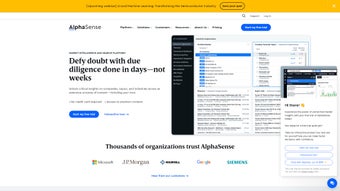

Download AlphaSense – Smart Market Intelligence & Research Tool
Overview
AlphaSense is a web‑based market intelligence platform that aggregates millions of research documents, earnings‑call transcripts, news articles, and analyst reports into a single, searchable interface. Designed for analysts, consultants, corporate strategists, and investment professionals, the service promises to cut the time spent sifting through disparate data sources by delivering relevant insights within seconds. The platform’s core strength lies in its powerful natural‑language search engine, which understands context, synonyms, and industry‑specific jargon, allowing users to type queries in plain English and receive precise results.
Privacy is baked into the architecture: AlphaSense uses cookies only to enhance navigation speed and to remember user preferences, while offering a clear consent panel for those who wish to customize their data footprint. Anonymous analytics are also collected, not for advertising, but to improve the platform’s performance and to identify emerging research trends that benefit the broader user community. In practice, AlphaSense acts as a digital research assistant that surfaces critical information—such as competitive moves, market sizing, regulatory changes, and emerging technologies—right when you need it, helping decision‑makers stay ahead of the curve without the usual manual digging.
The solution also supports role‑based access controls, ensuring that sensitive research stays within authorized teams, and it complies with major data‑protection regulations such as GDPR and CCPA. For organizations that operate across multiple regions, the multi‑language support and localized data sources further enhance the platform’s global relevance. Overall, AlphaSense combines breadth of coverage, AI‑driven relevance, and a privacy‑first mindset to create a compelling research environment for modern enterprises.
Key Features & Functionalities
- AI‑Driven Search Engine: Understands natural language queries, recognizes industry jargon, and returns ranked results from a curated corpus of over 100 million documents.
- Real‑Time Alerts: Customizable notifications that trigger when new content matching your keywords or company watch‑list appears.
- Document Highlighting & Annotation: Built‑in tools let you highlight passages, add notes, and share insights directly with teammates.
- Advanced Filters: Narrow results by source type, publication date, geography, or confidence score to focus on the most relevant material.
- Collaboration Workspace: Team folders, permission settings, and activity logs make it easy to collaborate on research projects.
- Export Options: Export snippets, full documents, or search results to PDF, CSV, or integrate via API with your BI stack.
- Privacy Controls: Granular cookie preferences and a transparent privacy policy ensure compliance with GDPR and CCPA.
- Multi‑Device Access: Responsive web design lets you work from Windows, macOS, Linux, or mobile browsers without installing a separate app.
Each feature is crafted to support both quick fact‑checking and deep‑dive research. For example, the AI‑driven search not only returns documents but also highlights the exact sentences that match the query, reducing the need to scroll through long PDFs. Real‑time alerts keep you informed about competitor earnings releases or regulatory filings the moment they are published, which is invaluable for fast‑moving sectors like technology or biotech.
Collaboration tools eliminate the old email‑attachment workflow; instead, a team can comment directly on a transcript, assign tasks, and track who viewed each piece of content. Export capabilities mean you can pull data into Excel for quick modeling or feed it into a data warehouse for larger analytics pipelines. The advanced filters let power users slice the data by geography or confidence score, helping them prioritize the most trustworthy sources.
Meanwhile, privacy controls give administrators the ability to enforce cookie consent policies and audit data‑access logs, meeting strict corporate governance standards. The multi‑device access ensures that whether you are in a boardroom, at a coffee shop, or traveling on a train, the same rich set of tools is available instantly, keeping your research momentum uninterrupted. Together, these functionalities position AlphaSense as a one‑stop shop for market intelligence professionals who demand speed, accuracy, and security.
Installation, Usage & Compatibility
Getting Started – No Download Required
Because AlphaSense is delivered as a SaaS solution, there is no traditional installation process. Users simply create an account on the official website, verify their email address, and log in through any modern browser (Chrome, Edge, Firefox, Safari). The onboarding wizard guides new users through setting up their first watch‑list, selecting preferred document sources, and configuring alert thresholds.
For organizations that need single‑sign‑on (SSO), AlphaSense integrates with SAML, Okta, and Azure AD, allowing IT administrators to provision access without managing separate passwords. The platform also offers granular role‑based permissions, so managers can assign view‑only or edit rights to specific folders, ensuring that sensitive research remains protected. During the first login, users are prompted to complete a brief tutorial that showcases key shortcuts, filter usage, and annotation features, helping them become productive within minutes rather than hours.
How to Use the Search Effectively
The search bar sits prominently at the top of the dashboard. To get the best results, type a natural‑language question such as “What are the latest trends in renewable energy financing?” AlphaSense’s AI engine will parse the query, match it against its indexed corpus, and return a list of documents with highlighted excerpts. Users can refine results with the filter pane on the left, selecting “Earnings Calls” or “Regulatory Filings” to narrow the scope.
Saved searches appear in the “My Queries” tab, enabling quick re‑runs as new data becomes available. For power users, Boolean operators (AND, OR, NOT) and proximity search (e.g., “solar NEAR/5 grid”) are also supported. The platform also offers a “Smart Suggest” feature that automatically proposes related keywords and alternative phrasings, helping users discover hidden insights they might have missed.
Additionally, the “Export to Insight Sheet” button creates a pre‑formatted summary that can be inserted directly into presentations or reports, streamlining the workflow from research to delivery.
Supported Operating Systems & Devices
AlphaSense is built on responsive web technology, which means it works seamlessly across Windows 10/11, macOS Monterey and later, Linux distributions, as well as mobile browsers on iOS and Android. Because the platform does not require a native client, updates are rolled out server‑side, guaranteeing that every user accesses the latest features and security patches without manual effort. For teams that prefer a dedicated desktop experience, AlphaSense offers an optional Electron‑based wrapper for Windows and macOS, but the core functionality remains identical to the browser version.
Security‑focused organizations will appreciate the platform’s TLS 1.3 encryption, regular penetration testing, and SOC 2 Type II compliance. Data at rest is encrypted using AES‑256, and role‑based access controls ensure that sensitive research stays within the appropriate audience. In addition, audit logs capture every view, download, and annotation activity, giving compliance officers a complete trail for regulatory reviews. For users on slower connections, the platform includes a lightweight “Data‑Lite” mode that delivers compressed previews of documents while preserving search relevance. In summary, AlphaSense delivers a frictionless setup, intuitive usage flow, and broad compatibility across all major operating systems, making it an attractive choice for enterprises that value both convenience and governance.
Pros, Cons & Frequently Asked Questions
Pros
- Instant access to a massive, curated knowledge base spanning multiple industries.
- AI‑enhanced search reduces time spent on manual filtering and improves relevance.
- Real‑time alerts keep users up‑to‑date with market movements and competitor activity.
- Robust collaboration features streamline team research and eliminate version‑control issues.
- Transparent privacy controls and compliance certifications (GDPR, CCPA, SOC 2).
- No client installation; works on any modern browser and offers an optional desktop wrapper.
- Extensive export options and API access enable integration with existing BI and data‑warehouse tools.
- Responsive design provides full functionality on mobile devices without a native app.
Cons
- Subscription cost may be high for small consultancies or individual freelancers.
- Advanced filters, API access, and some collaboration tools are limited to higher‑tier plans.
- Learning curve for power‑user query syntax and advanced Boolean operators.
- Dependence on internet connectivity; offline access is not available.
- Limited native mobile app experience compared to dedicated iOS/Android applications.
- Custom integration projects may require additional developer resources and time.
FAQ
Is there a free trial for AlphaSense?
Yes, AlphaSense offers a 14‑day free trial that provides full access to the core search and alert features, allowing users to evaluate the platform before committing to a paid subscription.
Can AlphaSense integrate with existing BI tools?
AlphaSense provides a RESTful API and export options (CSV, JSON) that can be connected to Tableau, Power BI, or custom dashboards, enabling seamless data flow into existing analytics pipelines.
What security certifications does AlphaSense hold?
The platform is SOC 2 Type II compliant, utilizes TLS 1.3 for data in transit, and encrypts data at rest with AES‑256. Regular third‑party penetration tests are conducted to maintain a high security posture.
How does AlphaSense handle data privacy and cookies?
Cookies are only used to improve navigation speed and store user preferences. Users can manage consent through a clear cookie‑preference banner, and all analytics data is anonymized to comply with GDPR and CCPA.
Is there a mobile app for AlphaSense?
AlphaSense does not currently have a native iOS or Android app, but its responsive web design works smoothly on mobile browsers, providing full search, alerts, and annotation capabilities on the go.
Can I customize the look‑and‑feel of the dashboard for my team?
While the core UI is standardized for consistency, administrators can configure branding elements such as logo, primary color, and custom welcome messages through the account settings panel.
Review Summary
Overall Rating: 4.5 / 5
Pros: Comprehensive data coverage, AI‑driven relevance, strong collaboration, robust security, flexible export options.
Cons: Premium pricing, limited offline capability, learning curve for advanced queries, no native mobile app.
Conclusion & Call to Action
AlphaSense stands out in the crowded market‑intelligence space by delivering an exceptionally fast, AI‑enhanced search experience that aggregates millions of documents into a single, privacy‑first platform. Professionals who need to stay ahead of competitors, monitor regulatory shifts, or simply accelerate their research workflow will find the tool’s real‑time alerts, collaborative workspaces, and export options indispensable. While the subscription price may be a barrier for very small teams, the productivity gains and reduced time‑to‑insight often justify the investment for mid‑size firms and enterprises. If you’re ready to replace manual spreadsheet tracking and fragmented news feeds with a unified, secure research hub, click the button below to start your free trial and experience AlphaSense’s speed and depth first‑hand.



.png)



